Wireless Keyboard + Mouse Combo for Mac & iPad Setup
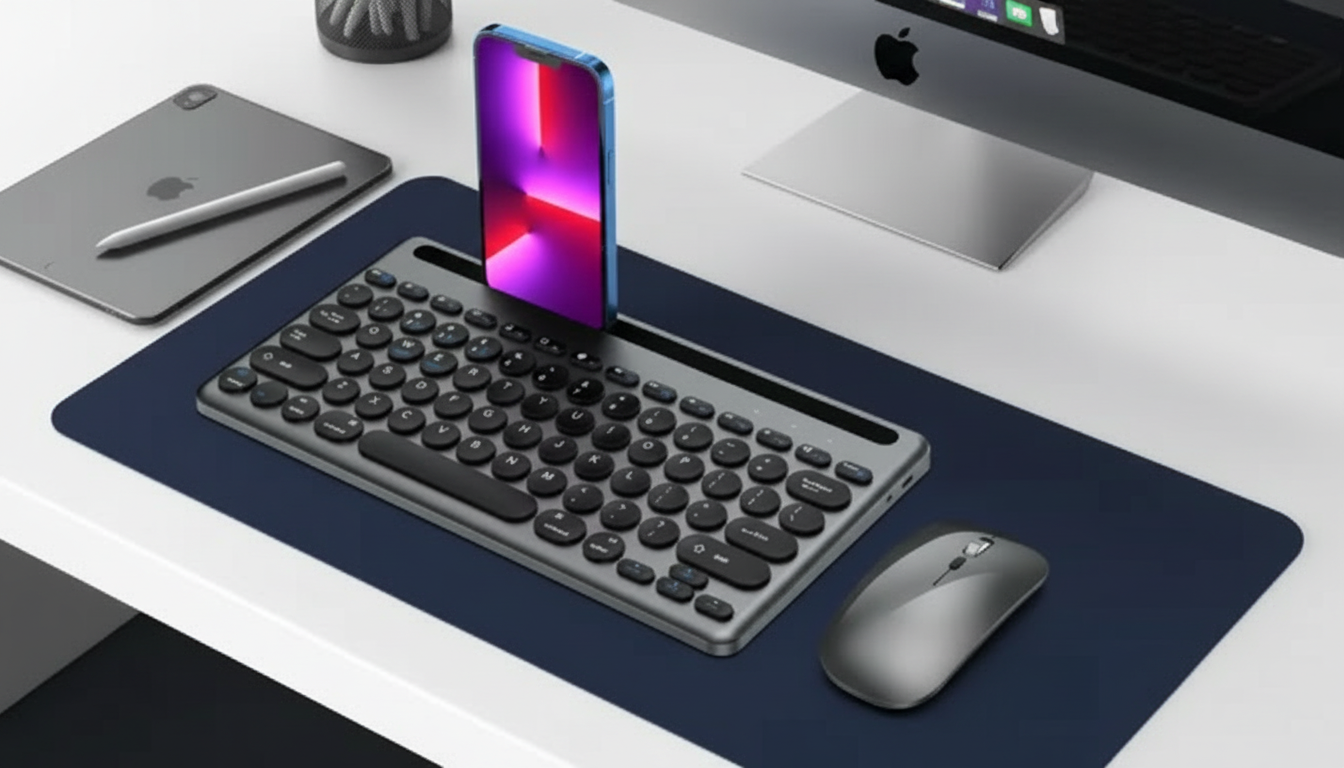
Wireless Keyboard and Mouse Combo for Apple Devices: A Simple Desk Upgrade for Mac and iPad
A matching keyboard and mouse can make everyday tasks on a Mac, iPad, or other Apple-compatible setup feel more consistent—especially when switching between work, school, and casual browsing. A good combo reduces visual clutter, simplifies setup, and helps your desk (or travel kit) feel like one cohesive system instead of a pile of mixed peripherals.
What a keyboard-and-mouse combo changes day to day
A combo set is a small change that can noticeably improve how your setup feels from the first hour of use. The biggest difference is consistency: the keyboard and mouse are designed to work together, which often means fewer tiny annoyances over time.
- Cleaner setup: one coordinated pair reduces the “mixed gear” feel on a Mac desk or iPad workstation.
- Faster onboarding: setting up both input devices at once is usually simpler than troubleshooting mismatched brands/models.
- Consistency: similar key feel and pointer behavior can reduce small frustrations during long sessions.
- Good fit for shared devices: easier to store, hand off, and reset than multiple separate peripherals.
Compatibility checklist for Apple devices
Before buying any wireless combo for Apple hardware, confirm the basics: which devices are supported, how it connects, and whether the layout matches how you actually work (shortcuts, function keys, and daily habits).
Quick compatibility checks before buying
| Check | Why it matters | What to confirm |
|---|---|---|
| macOS / iPadOS support | Avoid pairing issues and missing keys | Supported OS versions and device types |
| Bluetooth vs USB receiver | Determines how you connect and switch devices | Required receiver/adapter; multi-device capability if needed |
| Keyboard layout | Comfort and speed | Key spacing, shortcut keys, language/layout |
| Mouse tracking style | Pointer control on different surfaces | Works on your desk surface; adjustable speed if preferred |
| Power/battery method | Maintenance and travel readiness | Rechargeable vs replaceable batteries; auto-sleep behavior |
If you’re planning to use a combo with an iPad, connection type matters even more. Bluetooth is typically the simplest path. If a USB receiver is required, you may need an adapter or hub depending on your iPad model and available ports. Apple’s guidance on Bluetooth pairing and iPad pointer support is helpful when verifying what your setup can do: Apple Support: Connect Bluetooth devices and Apple Support: Use a mouse or trackpad with iPad.
Setup basics: pairing, switching, and everyday reliability
The best wireless peripherals are the ones you stop thinking about. A smooth setup is usually less about “tricks” and more about doing the basics in the right order.
- Pairing steps: start with fully charged batteries (or fresh batteries), then connect one device at a time to isolate issues.
- Connection stability: keep the first pairing close to the device; reduce interference by moving away from crowded USB hubs or strong wireless sources.
- Switching devices: if the combo supports multiple devices, label profiles (MacBook, iPad, etc.) to reduce mistakes when jumping between screens.
- Troubleshooting habits: if lag appears, re-pair, replace/charge power, and confirm OS accessibility settings aren’t altering pointer/keyboard behavior.
For day-to-day reliability, it also helps to keep your system updated and avoid stacking receivers or hubs directly beside other wireless dongles. Small changes in placement can noticeably improve stability.
Comfort and performance: typing feel and mouse control
Comfort is where “good enough” peripherals start to feel limiting. If you type for long stretches or spend hours navigating documents and tabs, small ergonomic details matter.
Battery life and portability for MacBooks and iPads
Who this combo is a good fit for
At-a-glance buying guide: compare common combo styles
| Style | Best for | Trade-offs to consider |
|---|---|---|
| Compact combo | Small desks, travel, iPad setups | Less spacing; may skip dedicated keys |
| Full-size combo | Home office, spreadsheets, longer sessions | Takes more space; less travel-friendly |
| Bluetooth-focused combo | Minimalist setups across Apple devices | Pairing/switching behavior varies by model |
| USB receiver combo | Desktops or plug-and-play preference | May need adapters on iPads; port availability matters |
Product option
If the goal is a clean, Apple-friendly setup without overthinking it, the Wireless Keyboard Mouse Combo for Apple Devices is a practical starting point for everyday typing, browsing, schoolwork, and a tidier desk. Confirm the connection method and supported devices on the product page, then pair and test it at your main desk first before deciding whether it earns a permanent spot in a travel kit.
Related Apple accessories for a more cohesive setup
- Soft Silicone Band for Apple Watch for an easy, comfortable daily option.
- Premium Leather Strap for Apple Watch for a more classic look that can dress up a simple setup.
FAQ
Will a wireless keyboard and mouse work with an iPad?
Many models work well with iPadOS, especially Bluetooth options. If the combo relies on a USB receiver, you may need an adapter or hub depending on your iPad’s port, so checking the supported devices and connection method before buying helps avoid surprises.
What should be checked before buying a combo for a MacBook?
Confirm the connection type (Bluetooth or USB receiver), the keyboard layout and shortcut support, and the battery/charging method. Also consider whether you need to switch between devices and verify compatibility with your macOS version and available ports.
Why choose a combo instead of buying a keyboard and mouse separately?
A combo is usually simpler to set up, looks more cohesive, and often delivers a more consistent feel between typing and pointer control. Separate purchases can still make sense when you want highly specialized ergonomics or a very specific mouse shape.







Leave a comment